Scrum works in theory for teams of almost any size. In practice, it tends to work well for large, well-staffed engineering organizations and inconsistently for small teams — not because the framework is wrong, but because the process overhead assumes resources that small teams do not have. A dedicated Scrum master. A product owner with enough time to groom the backlog continuously. Separate tooling for each ceremony. Dashboards built by someone whose job it is to maintain them.
Small teams that adopt Scrum usually adapt it. They run shorter standups, combine the product owner and Scrum master roles, and skip ceremonies when the sprint is busy. The result is a lighter process that can function — but also a process that relies heavily on individual discipline rather than structural support. When someone is off sick, or when the sprint gets busy, the framework erodes faster than it should.
The right software changes this equation. Not by adding more ceremony, but by building the structural elements of Scrum — sprint cadence, WIP limits, ceremony tracking, velocity measurement — into the board itself so the framework does not depend on any single person to keep it running.
Why Scrum breaks down for small teams — and what actually causes it
The failure mode for small teams running Scrum is almost always the same: the sprint starts well, active work accumulates in the middle stages, and by the end of the sprint the board shows five things in progress, two in review, and fewer items in done than were committed. The retrospective identifies the problem. The next sprint starts the same way.
The root cause is not a lack of discipline. It is a lack of structural constraint. When there is no WIP limit on the In Progress column, it is rational for each team member to pull new work whenever they are blocked, rather than working to unblock the stuck item. The result is a board where everything is moving and nothing is finishing.
For large teams, a dedicated Scrum master can enforce these norms manually. For small teams, the Scrum master role is typically handled by whoever has the most bandwidth that week — which means enforcement is inconsistent at best. The solution is to build the constraint into the tooling: a column-level WIP limit that makes the problem visible before it becomes a sprint-end crisis.
The second failure mode is ceremony drift. Sprint planning becomes a quick verbal sync with no record. The daily standup happens in a messaging thread and loses its structure within a few weeks. Reviews and retrospectives get skipped when delivery pressure is high. Without a dedicated place in the board for these rituals — not just a note that they should happen, but actual tasks representing each ceremony — they are easy to defer indefinitely.
What Scrum project management software needs to cover
Good Scrum project management software for small teams needs to do three things without adding overhead: enforce sprint structure, make ceremonies visible, and track velocity in a way that improves planning over time rather than just documenting what happened.
Sprint structure means the board reflects an actual sprint cadence — not just a generic task list with a due date added to it. The columns should map to the Scrum flow: backlog, active work, review, testing, done. Sprint results should be visible as a distinct area, not merged with the active board, so teams can look back at previous cycles without reconstructing history from memory.
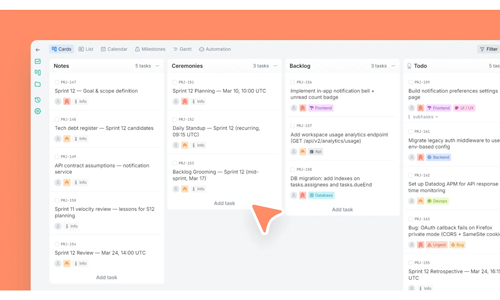
Ceremony visibility means there is a dedicated place in the board for sprint rituals. Planning, daily standup, sprint review, and retrospective should each have a lane or a column where the team can create a task, record outcomes, and track action items that flow into the main board. This makes ceremonies a first-class part of the sprint workflow rather than an informal parallel process that exists outside the tooling.
Velocity tracking means having the data to compare planned effort against actual effort, sprint over sprint. This does not require complex analytics. It requires two things: a sprint number field on every task, and an estimated versus logged time comparison that is easy to review at the end of each cycle. With that data, a small team can identify which types of work are consistently underestimated and adjust future commitments accordingly.
Sprint planning without the ceremony overhead
Sprint planning is where most small teams lose time they cannot afford to lose. A planning session that should take an hour stretches to three because the backlog is not groomed, the stories are not sized, and the team is deciding what the sprint should contain at the same moment they are deciding what each task actually involves.
Software that supports sprint planning properly keeps the pre-planning work — backlog prep, scope assumptions, sprint goals — visible before the planning session begins. A Notes column or a dedicated backlog prep area gives the team a place to draft sprint goals, flag dependencies, and record scope assumptions without mixing them into the active task flow. When planning starts, the context is already there.
Effort sizing does not need to be complex for small teams. A sprint number field on each task, combined with estimated time before the sprint and logged time afterward, gives a practical picture of capacity without requiring story points, planning poker, or a separate estimation tool. The comparison between estimated and logged time over three or four sprints is enough to make planning commitments significantly more accurate.
WIP limits and why they matter more than the sprint board
WIP limits are the most underused feature in Scrum tooling, and the one with the most direct impact on sprint outcomes for small teams.
A WIP limit on an In Progress column caps how many tasks can be in active work at the same time. If the limit is set to match the team size — one active task per person, or two for a team of two — the board becomes self-regulating. A developer who finishes a task cannot simply pull another one if the column is at its limit. They have to help move a stuck item forward first. This is the behavior Scrum is designed to produce. Without the structural constraint, it rarely happens.
The same logic applies to the Review column. A Review stage without a WIP limit tends to accumulate work — reviewers are busy, items wait, and the bottleneck becomes invisible until the sprint is almost over. A WIP limit on Review makes the accumulation visible immediately, which creates the pressure to address it before it becomes a delivery problem.
For small teams, the right WIP limits are aggressive. The goal is not to accommodate everyone’s preference for parallel work — it is to force the team into the finishing behavior that makes sprints predictable. This is uncomfortable at first and productive very quickly.
Engineering task categories and why structure matters
One of the practical advantages of purpose-built Scrum tooling over generic task boards is task categorization. In software development, not all tasks are equivalent. A frontend bug, a database migration, an API integration, and a DevOps configuration change all require different attention, carry different risk profiles, and belong to different parts of the team.
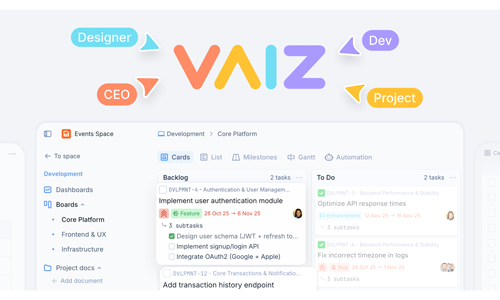
A board that treats all tasks as generic to-dos loses this information. A board with dedicated task types — Frontend, Backend, API, Database, DevOps, UI/UX, plus operational categories like Urgent, Bug, and Blocked — makes it easy to see at a glance what the sprint contains, who is responsible for which type of work, and where the risk is concentrated.
Task types also help with retrospectives. If the team consistently underestimates Backend tasks and overestimates Frontend tasks, that pattern is invisible in a generic board. It is visible immediately when tasks are categorized and the sprint results are reviewed with that filter applied.
An Urgent task type plays a structural role too. Unplanned work is a reality for every small team. When urgent work arrives mid-sprint, the decision it creates — what gets displaced or de-prioritized — should be made explicitly. A dedicated Urgent task type forces that conversation rather than letting unplanned work absorb sprint capacity invisibly.
What to look for when evaluating Scrum tools for a small team
The most important question when evaluating an all-in-one work management tool for Scrum is whether the board structure actually enforces Scrum mechanics, or whether it simply provides a visual interface that requires the team to enforce the mechanics manually.
Column-level WIP limits should be configurable and visible on the board itself — not hidden in settings, not optional fields that nobody fills in. The sprint cadence should be reflected in a distinct Sprint Results area that persists across cycles rather than getting archived and forgotten. Ceremonies should have a home in the board, not just a recommended practice in the onboarding documentation.
Velocity tracking should come from the work itself. If tracking velocity requires a separate data entry step — logging hours in a different tool, updating a spreadsheet at the end of the sprint — it will not happen consistently enough to be useful. Sprint number, estimated time, and logged time fields on each task give the team what they need without creating parallel maintenance work.
Free plans matter more for small teams than they do for large organizations. A small team evaluating Scrum software should be able to run at least one full sprint — from planning to retrospective — on a free plan before making any commitment. If the free plan restricts the features needed to test the framework properly, the evaluation itself is unreliable.
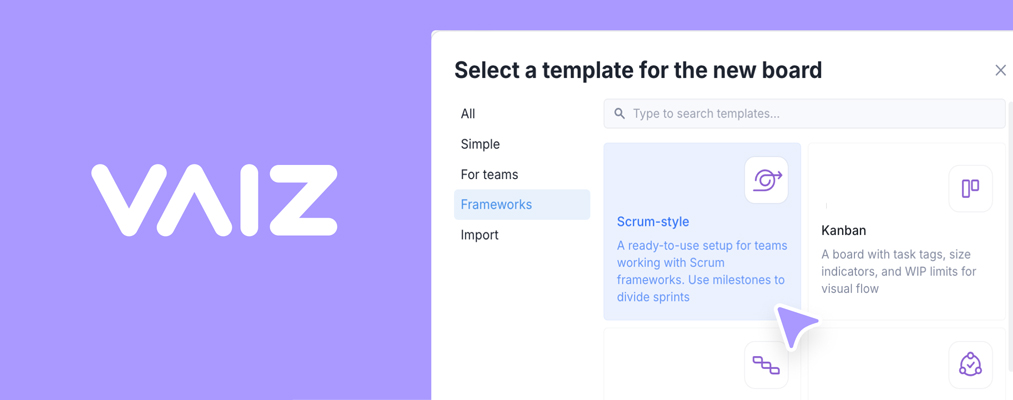
Vaiz offers a free Scrum board template with all core structural features included: a Ceremonies lane for sprint rituals, a Sprint Results area for outcomes and learnings, WIP limits on active columns, sprint number and time-tracking fields, and ten engineering task categories including Frontend, Backend, API, Database, DevOps, and UI/UX. The free plan supports up to ten users. Teams can run a complete sprint from planning to retro without a paid subscription — which means the evaluation reflects real use, not a restricted preview.
Making Scrum work without a dedicated Scrum master
The central challenge for small teams running Scrum is maintaining process discipline when nobody has that as their primary job. The answer is not to hire a Scrum master the team cannot afford — it is to use tooling that builds the discipline into the structure rather than relying on any individual to enforce it.
WIP limits that prevent column overload. Ceremony tasks that make rituals visible as first-class work. Sprint results that accumulate across cycles so the team can see their own patterns. Velocity data that comes from the board rather than from a separate tracking process. These are the mechanics that allow a three-person engineering team to run Scrum as effectively as a larger one with dedicated process support.
The framework is simple. The discipline is structural. The software either provides that structure or it does not. For small teams, the difference between those two outcomes is the difference between Scrum that actually improves predictability and Scrum that functions as a label on a task board.
Frequently asked questions
What is Scrum project management software?
Scrum project management software is a tool designed to support the Scrum agile framework — structured around fixed-length sprints, ceremony tracking (planning, standups, review, retrospective), and iterative delivery. It typically includes a sprint board with column-level WIP limits, a backlog, sprint planning tools, and a way to track velocity across cycles.
Do small teams need a dedicated Scrum master to run Scrum effectively?
Not if the tooling enforces the structure. A Scrum master’s primary role is to maintain process discipline — ensuring WIP limits are respected, ceremonies happen, and the retrospective produces actionable outcomes. Software that builds these constraints into the board (column limits, ceremony tasks, sprint results tracking) reduces the dependency on any one person to uphold the framework.
What is the difference between Scrum and Kanban?
Scrum operates in fixed-length sprints — typically one to two weeks — with defined ceremonies, a committed scope, and a review at the end of each cycle. Kanban is a continuous flow system with no sprint boundaries, focused on throughput and cycle time rather than committed delivery. Scrum suits teams that benefit from regular planning and delivery cadence; Kanban suits teams doing ongoing operational or support work where batch delivery is less relevant.
How do WIP limits improve sprint outcomes?
WIP limits cap how many tasks can be in active work at the same time. Without them, team members tend to pull new tasks when blocked rather than helping clear the bottleneck — which leaves multiple items half-finished at sprint end. A column-level WIP limit makes the bottleneck visible immediately and creates structural pressure to resolve it before pulling more work in. For small teams, aggressive WIP limits (one or two items per person in progress) tend to improve predictability faster than any process change.
How do you track sprint velocity without complex tooling?
Sprint velocity is the amount of work completed in a sprint relative to what was planned. A practical baseline requires two things: a sprint number field on every task, and an estimated versus logged time comparison at sprint end. Over three to four sprints, the ratio of estimated to actual effort by task type — frontend, backend, API, and so on — gives the team enough data to make planning commitments significantly more accurate without requiring dedicated analytics software.
Related Categories